Page 2 of 3
Re: [Categories] Pre-populate them
Posted: Fri 27 Sep, 2024 6:33 pm
by Amazone
oh that would be great!!!
Re: [Categories] Pre-populate them
Posted: Sat 28 Sep, 2024 12:59 pm
by Campbell
Campbell wrote: Fri 27 Sep, 2024 3:59 pm
I always got Investment Income Interest proposed and cannot erase the Interest at the end.
Ok, I think I see what you mean. I'll get this fixed.
So it turns out this had been intentional functionality - so you only needed to type a partial match into the dropdown, and if there was only one possibility left it would select that item. But I can see this doesn't allow for if you actually wanted the value to be a subset of an existing item. So I've changed this so that if you tab out of the dropdown, it will auto-select any item, but if you click out of the dropdown it won't. I think this works fairly well in practice, but you can let me know what you think when I put the update out.
You should still have full control over the categories in Static Data however.
Re: [Categories] Pre-populate them
Posted: Sat 28 Sep, 2024 3:10 pm
by Amazone
So I was planning to enter the categories as in my Money into More Money.
I created a Category Sint Gillis with parent Investment income - see attachment.
I see no button "add"
I see no possibility to enter a new Category
Re: [Categories] Pre-populate them
Posted: Sat 28 Sep, 2024 6:31 pm
by Campbell
It's on the right-click menu. But that's really great feedback. I assumed that would be intuitive, but perhaps I need to add more options. In fact, adding those as buttons on the ribbon (main toolbar) would make sense.
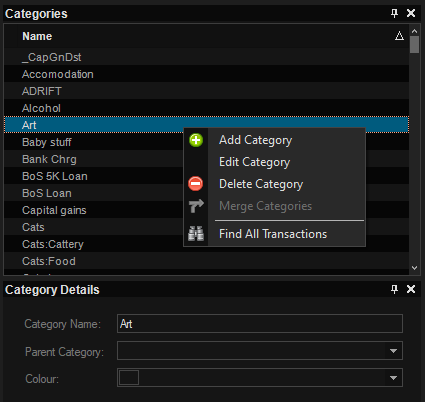
- image.png (16.09 KiB) Viewed 211 times
Re: [Categories] Pre-populate them
Posted: Sun 29 Sep, 2024 10:20 am
by Amazone
If you need someone to have all sorts of problems I am your girl!!!!
So:
I had entered one Category Sint Gillis with Parent Category Investment income.
I right clicked and tried to add Category Interest with same parent Category.
Parent category Investment income was not proposed !!!
And:
I got error screen (see attachment) - it says in Dutch: Category already exists.
Yes I entered it in a transaction. But it did not show in categories!!
Only way to get out was to restart MM
Then Categories showed Sint Gillis with no parent category.
I right clicked on edit but Parent category remained empty.
So no use continuing.
Another question:
With money when I open Money I get the last opened moneyfile.
In MM I always need to enter file name.
Is there a way to open last opened?
Re: [Categories] Pre-populate them
Posted: Sun 29 Sep, 2024 11:46 am
by Campbell
Aargh, ok thanks. I think I've managed to reproduce that, so will get that fixed in the next release.
Re auto-opening the last used file, if you click on the cog in the top right:
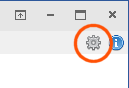
- image.png (3.02 KiB) Viewed 206 times
then there's an option:
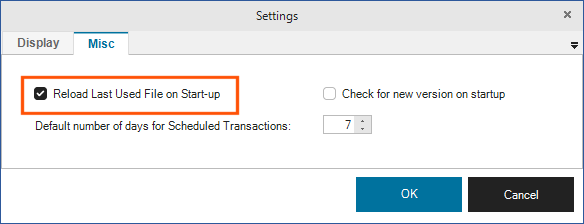
- image.png (7.94 KiB) Viewed 206 times
Re: [Categories] Pre-populate them
Posted: Sun 29 Sep, 2024 2:04 pm
by Amazone
Re-opening is OK now. Thx.
I can't do much until issues are solved.
Tried to open calendar.
Nothing happens.
I had Categories opened.
When I closed Categories Calendar was there.
One would expect it to open in new section as with account and category.
But OK that is because I am trying all sort of things.
I do not yet see the use of calendar.
Re: [Categories] Pre-populate them
Posted: Sun 29 Sep, 2024 2:12 pm
by Campbell
Ok, what's happened here is that the calendar did actually open, but the categories window was taking up all the available space in the dock area. If you made the main window larger, you'd most likely see them both side-by-side.
I'll change the way the calendar opens, so it should resize the categories window to fit the calendar.
The main purpose of the calendar (at the moment) is just to help visual upcoming payments. But I plan on expanding the functionality later, such as showing expected investment dividends, and custom reminders etc.
Re: [Categories] Pre-populate them
Posted: Mon 30 Sep, 2024 11:19 am
by Amazone
Thank you
Note : I was on full screen so could not make main screen larger.
Meanwhile I have one other thing.
Yesterday I opened my Microsoft Money and I got a completely new view. The one from Money plus sunset Deluxe.
It could not load my Microsoft Money file.
What happened was : Some days ago I found a link to Money Sunset and tried installing it on my PC. I got message that Money was already installed. I immediately stopped the download but it must have messed up my Microsoft Money anyway.
Thank god I have Acronis on my PC and I make images on a monthly base.
I went back to the image of last month. Before installing More Money.
More Money was still on the pc because it was not on C but on D partition.
But: When I opened MM I it did not open last opened file.
The setting for MM to open last opened file was not set anymore although I had set this the day before.
So my question is: could this setting be stored somewhere on C drive???? I see no other reason for the setting being changed.
Re: [Categories] Pre-populate them
Posted: Mon 30 Sep, 2024 5:51 pm
by Campbell
Yes, certain config settings are stored outwith the save file, such as window size, location, theme, reload last used file, check for start-up etc. They should be saved in a config file somewhere in C:\Users\<username>\AppData\Local\MoreMoney, so that would make sense with what you are seeing.