Page 1 of 2
Exporting data from Moneyspire
Posted: Thu 04 Dec, 2025 5:56 pm
by Frelon
Moneyspire gives the option of exporting data in csv or qif files. I tried an account export in qif and then tried to import into Maxim Money! The import failed with numerous import error codes (such as Import Error, Unknown Action on Line 21773:)
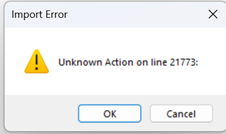
- image.png (11.75 KiB) Viewed 1587 times
I then tried the export into csv format. This worked and I confirmed that the data, when viewed in Excel, was correct!
The challenge then is to convert this data accurately into a qif file. I tried csvconvert which seemed to do a good job, but when importing a large file (2 years data) into Maxim I found a number of transacions missing! Not good!
Any help in converting a csv file into qif would be appreciated.
Re: Exporting data from Moneyspire
Posted: Thu 04 Dec, 2025 7:44 pm
by Campbell
Are you able to edit the QIF file output by Moneyspire and send me a sample of the transaction around line 21773? They must be outputting data that I haven’t coded to recognise, although from the screenshot it suggests a blank action.
Re: Exporting data from Moneyspire
Posted: Sat 06 Dec, 2025 9:53 am
by Frelon
You now have it Campbell! Good luck deciphering it!
Re: Exporting data from Moneyspire
Posted: Sat 06 Dec, 2025 11:36 am
by Campbell
Thanks, making some good progress so will put an update out in the next few days that should handle this better.
Some issues appear to be mistakes in the MoneySpire output too, but these are easy to fix in the file.
Re: Exporting data from Moneyspire
Posted: Mon 08 Dec, 2025 5:49 pm
by Frelon
Have tried exporting Reminders from Moneyspire (Scheduled Transactions in Maxim)!
Exported in QIF format and tried importing to Maxim. Error codes similar to..
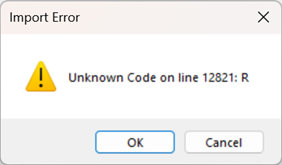
- image.png (16.84 KiB) Viewed 1573 times
Then exported in CSV and converted to QIF, then try to import these Reminders into Maxim!
Result was a new account! Not Scheduled Transactions!
Any help is appreciated to avoid manually inputting scheduled transactions!
Re: Exporting data from Moneyspire
Posted: Mon 08 Dec, 2025 10:12 pm
by Campbell
I wasn’t actually aware scheduled transactions could be output in QIF files. I will look into this.
Re: Exporting data from Moneyspire
Posted: Tue 09 Dec, 2025 2:34 pm
by Frelon
Update...
Then exported in CSV and converted to QIF, then try to import these Reminders into Maxim!
Result was a new account! Not Scheduled Transactions!
Believe it, or not, this actually worked - I think!!
Maxim Money was allowed to sleep overnight and when opened this morning my New Account had actually changed to Scheduled Transactions!!
I checked on Scheduled Transactions and there they were! It remains to be seen as to whether they will work (oh ye of little faith!)
Watch this space!
Re: Exporting data from Moneyspire
Posted: Tue 09 Dec, 2025 8:53 pm
by Campbell
I've improved the QIF import slightly in v1.7.5.2, so a) it gives a single error message for imports, so you don't have to click through each one, and b) to auto-detect whether accounts of type Invst are actually investment holdings, or simply investment bank accounts.
Re: Exporting data from Moneyspire
Posted: Wed 10 Dec, 2025 6:40 pm
by Frelon
I checked on Scheduled Transactions and there they were!
Latest update is that, yes, they are there, but only as single transactions! I have gone through the list and amended them to regular Scheduled Transactions.
Let's wait to the end of the month for things to happen!
Re: Exporting data from Moneyspire
Posted: Wed 10 Dec, 2025 10:31 pm
by Campbell
Yes, I think they'll just have come across as normal transactions, albeit future dated. In order to set them up as scheduled transactions, you'd need to right-click on each one and select Create Scheduled Transaction.
From what I can see, QIF has no way of exporting scheduled transactions, and no-one seems to have extended the format to do so, as far as I can see.