Page 2 of 3
Re: Attaching more than one attachment
Posted: Tue 09 Dec, 2025 7:20 pm
by Amazone
OK but is this slowing up my startup?
Do I need to send you the screencaptures?
Re: Attaching more than one attachment
Posted: Tue 09 Dec, 2025 7:47 pm
by Campbell
I don't think the price updates will be slowing the start-up, you can see they all happen within a few milliseconds. But something certainly seems to be, and I'll try and work out what.
Yes please, if you can send me a screen capture that would be very helpful.
Re: Attaching more than one attachment
Posted: Tue 09 Dec, 2025 8:03 pm
by Amazone
Done.
Re: Attaching more than one attachment
Posted: Tue 09 Dec, 2025 8:50 pm
by Campbell
I've added some additional logging in v1.7.5.2 on startup, to try to narrow down where the delay is. You may need to add the following section to the nlog config file to see all the new entries:
Code: Select all
<logger name="*" minlevel="Trace" maxLevel="Debug" writeTo="logfile" >
	<filters defaultAction="Ignore">
		<when condition="'${event-properties:item=Category}' == 'General'" action="Log" />
	</filters>
</logger>
Re: Attaching more than one attachment
Posted: Wed 10 Dec, 2025 9:47 am
by Amazone
I changed the log - see attachment
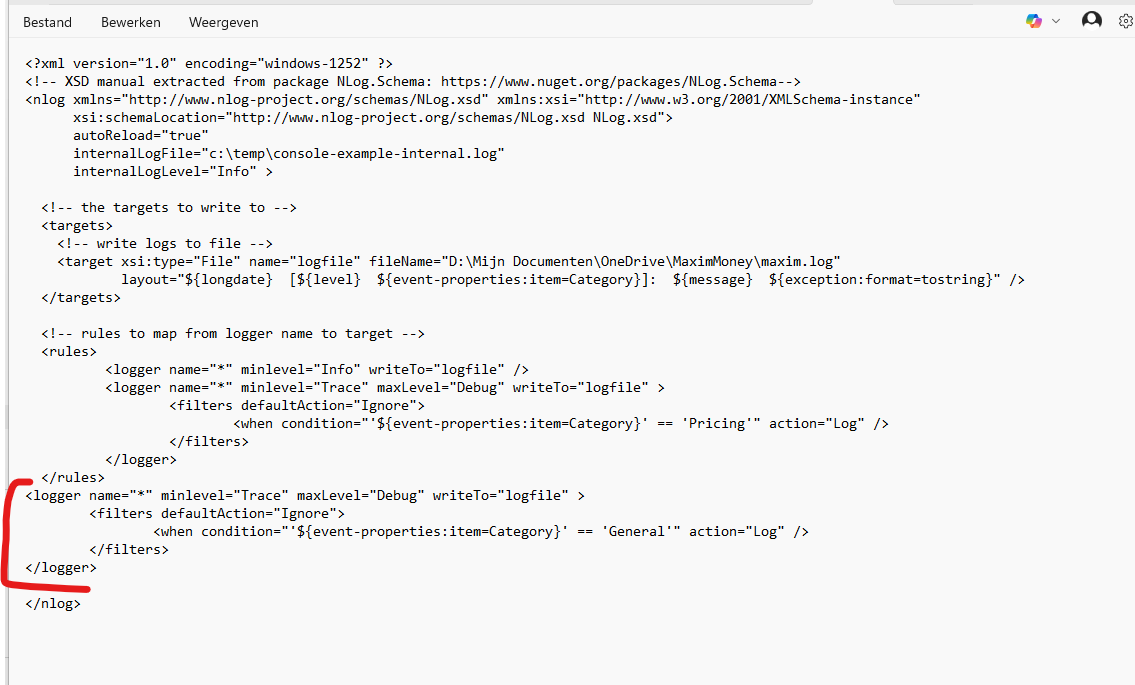
- Schermafbeelding 2025-12-10 103916.png (55.84 KiB) Viewed 2318 times
.
I first updated the program.
After that it restarted 3 times very fast. I thought the issue was solved.
But when I restarted again later it was slow again.
How do I add the log file here?
Re: Attaching more than one attachment
Posted: Wed 10 Dec, 2025 6:41 pm
by Campbell
Attaching log files in the forum was disabled by default. I've enabled this now.
Re: Attaching more than one attachment
Posted: Wed 10 Dec, 2025 7:10 pm
by Amazone
Re: Attaching more than one attachment
Posted: Wed 10 Dec, 2025 7:21 pm
by Campbell
I'm not seeing the new logging, but just realised I think you added the new section (highlighted in red in your image) in the wrong place. It should be before the </rules> entry, not after. Can you move it up a section and try again please, and we should see some additional entries in the log.
Re: Attaching more than one attachment
Posted: Wed 10 Dec, 2025 8:09 pm
by Amazone
I changed the loging file:
<?xml version="1.0" encoding="windows-1252" ?>
<!-- XSD manual extracted from package NLog.Schema:
https://www.nuget.org/packages/NLog.Schema-->
<nlog xmlns="
http://www.nlog-project.org/schemas/NLog.xsd" xmlns:xsi="
http://www.w3.org/2001/XMLSchema-instance"
xsi:schemaLocation="
http://www.nlog-project.org/schemas/NLog.xsd NLog.xsd">
autoReload="true"
internalLogFile="c:\temp\console-example-internal.log"
internalLogLevel="Info" >
<!-- the targets to write to -->
<targets>
<!-- write logs to file -->
<target xsi:type="File" name="logfile" fileName="D:\Mijn Documenten\OneDrive\MaximMoney\maxim.log"
layout="${longdate} [${level} ${event-properties:item=Category}]: ${message} ${exception:format=tostring}" />
</targets>
<!-- rules to map from logger name to target -->
<rules>
<logger name="*" minlevel="Info" writeTo="logfile" />
<logger name="*" minlevel="Trace" maxLevel="Debug" writeTo="logfile" >
<filters defaultAction="Ignore">
<when condition="'${event-properties:item=Category}' == 'Pricing'" action="Log" />
</filters>
</logger>
<logger name="*" minlevel="Trace" maxLevel="Debug" writeTo="logfile" >
<filters defaultAction="Ignore">
<when condition="'${event-properties:item=Category}' == 'General'" action="Log" />
</filters>
</logger>
</rules>
</nlog>
Re: Attaching more than one attachment
Posted: Wed 10 Dec, 2025 8:10 pm
by Amazone
The logs I attached are not loading?????
 maxim.log